WooCommerce AI Agent Readiness Checklist (2026): What AI Shopping Assistants Read, and What to Fix
Guide10 min readFacts checked on the date above
WooCommerce,agent-ready.
The checklist
Disclosure: Scelto makes a free WooCommerce plugin, mentioned at the end. Every check below works without it.
Short answer: AI shopping assistants mostly read a WooCommerce store like a visitor that doesn't run scripts: they fetch product pages and read the HTML, the Product structured data and your shipping and returns pages. Some read your public APIs, and some use a real browser. If a fact appears only after JavaScript runs, or a firewall challenges them, they miss it.
Most agent-readiness advice is written for Shopify. WooCommerce stores have different switches: site visibility, WordPress settings, plugins and themes. This checklist takes about ten minutes with a browser, says where to fix each item in WordPress, and ends with what's live and what's coming in agentic commerce on WooCommerce.
The checklist at a glance
| Check | How to check | Where to fix |
|---|---|---|
| Store is live | Open the shop in a private window | WooCommerce › Settings › Site visibility |
| Search engines not discouraged | Look at the setting | Settings › Reading |
| robots.txt allows agents | Open yourstore.com/robots.txt | Your SEO plugin's robots.txt editor, or the file |
| No firewall challenge | curl a product page (below) | Security plugin, host firewall, CDN |
| Store API answers | Open /wp-json/wc/store/v1/products | Security plugin rules for /wp-json/ |
| Price in the HTML | View source, or curl | Theme, currency or pricing plugin |
| Fresh cached pages | Change a price, reload as a visitor | Caching plugin, CDN purge rules |
| One Product schema | Rich Results Test or view source | WooCommerce or your SEO plugin, not both |
| GTIN or brand + MPN | Product › Inventory tab | Each product and variation |
| Factual description with specs | Read it as a stranger | Product description |
| Accurate stock | Compare a few products with reality | Product › Inventory, stock sync |
| Shipping and returns findable | Click from a product page | Refund and Returns page, footer links |
1. Access: can agents reach the store?
Short answer: the usual reasons agents can't see WooCommerce products are Coming soon mode, the "Discourage search engines" box, a security plugin or CDN that blocks or challenges them, a price drawn by JavaScript, or missing or duplicated product schema. Each is a setting or plugin change, not a rebuild. The first three are about access.
- Site visibility is Live. In WooCommerce › Settings › Site visibility, a store in Coming soon mode shows visitors and agents a holding page. Check in a private window, since you see the real store while you're signed in.
- "Discourage search engines from indexing this site" is unticked (Settings › Reading). It asks crawlers to stay away, and many AI agents respect it.
- robots.txt lets search and shopping agents in. WordPress serves a robots.txt for you; SEO plugins such as Yoast SEO and Rank Math let you edit it. The agent names are the same as on any platform; see our robots.txt guide for which ones to allow and which only train models.
- Security plugins, host firewalls and CDNs don't challenge them. These often block or challenge by user agent, so the store looks offline to an agent. Allow the agents you want, and keep CAPTCHAs for login and checkout rather than product pages. Some assistants now sign their requests (Web Bot Auth) so that sites can verify who they are.
- The Store API answers. WooCommerce's public product API at
/wp-json/wc/store/v1/productsis one of the things agents and tools read. Security plugins that lock down/wp-json/break it.
A quick test from a terminal: ask for a product page the way an agent does and look at the status code.
curl -sI -A "OAI-SearchBot/1.0" https://yourstore.com/product/your-product/ | head -1
curl -s https://yourstore.com/wp-json/wc/store/v1/products?per_page=1 | head -c 300
You want 200 on the first line and JSON from the second. A 403, a 503 or a challenge page means something in
front of WordPress is turning agents away.
2. Pages: what agents get without scripts
Short answer: ChatGPT search, Perplexity and most fetch tools read the HTML your server sends and run no scripts. If the name, price and availability aren't in that HTML, they don't exist for those agents.
- Name, price and stock are in the HTML. Use View Source (not Inspect) on a product page, or curl it, and search for the price. Currency switchers and dynamic-pricing plugins are the usual culprits: they draw the price after the page loads.
- Key facts are near the top. Browser agents read a few screens. Keep the price, stock and key specs above long menus, banners and review widgets.
- Cached pages aren't stale. Page caching is good for agents too, as long as product pages are purged when a price or stock level changes. Otherwise cached HTML and schema show yesterday's price.
- No instructions aimed at AI. Give agents the same facts as people. Agents treat hidden instructions as an attack and may warn the shopper.
curl -s https://yourstore.com/product/your-product/ | grep -o '"price":"[^"]*"' | head -33. Product data: what agents read first
Short answer: one Product schema per page with name, price, currency, availability, brand and a GTIN (or brand plus MPN), a factual description with specs, accurate stock, and shipping and returns stated where the product is. WooCommerce adds Product JSON-LD by default; SEO plugins can add a second, conflicting block.
- One Product block. WooCommerce core outputs Product structured data. Yoast SEO, Rank Math and schema
plugins can add their own. Two blocks with different prices or stock leave agents guessing. Check with Google's Rich Results
Test or by searching the page source for
"@type":"Product", and turn Product schema off in one of them. - Brand. Shoppers ask for brands by name. WooCommerce's own Product block doesn't include a brand, so stores often rely on their SEO plugin's block for it. If you do, keep that block and switch off the other one.
- GTIN, UPC, EAN or ISBN. Current WooCommerce has a field with that label in the product's Inventory tab,
and core adds it to the structured data as
gtin. Agents match the same product across sellers by barcode, not by title. When there's no barcode, give brand and manufacturer part number (MPN). - Variable products. Each variation needs its own price, stock and identifier. WooCommerce uses the variation's GTIN and doesn't copy the parent's onto it.
- A factual description with specs. Many agents and feeds get only the title and description. Specs kept in attributes a theme hides, or in tabs that load later, never reach them. Put size, material, weight, capacity and compatibility in the description as a short list.
- Images. Agents show the product's image when they present their picks.
4. Trust: shipping, returns and stock
Short answer: agents compare sellers on the delivered total, delivery time and return window, and they check the product can actually be bought. Make those facts accurate and easy to reach.
- Stock that's true right now. An agent that recommends an out-of-stock product loses the shopper's trust, and yours. Keep stock managed in WooCommerce or synced from your inventory system.
- A published Refund and Returns page. WooCommerce creates one; fill in the window in days, who pays return shipping and the exceptions. When it's published, current WooCommerce versions link it as the store's return policy in the structured data.
- Shipping times and costs. State delivery times in days and costs, including any free-shipping threshold, and link that page from product pages, not only the footer.
- A way to reach you. Link a contact page, email or phone number from the home page.
5. Agentic commerce on WooCommerce: what's live and what's coming
Short answer: on WooCommerce's protocol table (checked 17 November 2026), agent payments with Link and the WordPress Abilities API are live, MCP is in beta (WooCommerce 10.9 or later, WordPress 6.9) for reading products and orders, and UCP (Google) and ACP (Stripe) are "coming soon". An endpoint alone doesn't get a store listed in any assistant.
| Protocol or feature | Status on 17 November 2026 | Notes |
|---|---|---|
| Agent payments with Link (Stripe) | Live | Agents that pay with Link can check out on stores that take cards, with WooPayments or Stripe for WooCommerce |
| Abilities API | Live | Built into WordPress core |
| Model Context Protocol (MCP) | Beta | WooCommerce 10.9 or later, WordPress 6.9; products and orders |
| Universal Commerce Protocol (UCP), Google | Coming soon | Merchant Center and structured data are the groundwork |
| Agentic Commerce Protocol (ACP), Stripe | Coming soon | Through Stripe's Agentic Commerce Suite |
WooCommerce's own pages don't fully agree: its August 2026 post "From found to bought" gives an earlier MCP version than the protocol page. We use the protocol page and date it. Status changes quickly, so check the table yourself before you plan around it.
Third-party plugins on WordPress.org already add agent endpoints. As AISO notes, installing one doesn't give any assistant access by itself, and a plugin that takes orders deserves the same review as a payment gateway.
6. Let shoppers' agents ask your store (optional)
Short answer: poppy.json is the file for the Personal Agent Protocol (Poppy), an open standard Meta's Muse
uses to talk with businesses. Published at /.well-known/poppy.json, it tells a shopper's agent where the store's
own agent is. It's optional; no WooCommerce store has one unless something publishes it.
Scelto's free plugin publishes it when you turn on AI agents in WooCommerce › Scelto. Shoppers' agents can then ask your store's agent about products, sizes, stock, shipping and returns. It answers only from your catalog and policies, in the shopper's language, and invents no facts or discounts. When the shopper decides, the agent proposes the exact order terms, the shopper approves them in their own assistant, and your store gets a pending order that the shopper pays on your own checkout. Scelto never handles payment. It's off until you turn it on. Our Poppy guide covers the versions and what Muse actually uses.
How to run this check on your store
The manual route is the curl and View Source checks above, plus a look at the settings in the table. For a quicker read, the free agent check reads your public pages the way agents do, on any platform, with no sign-up.
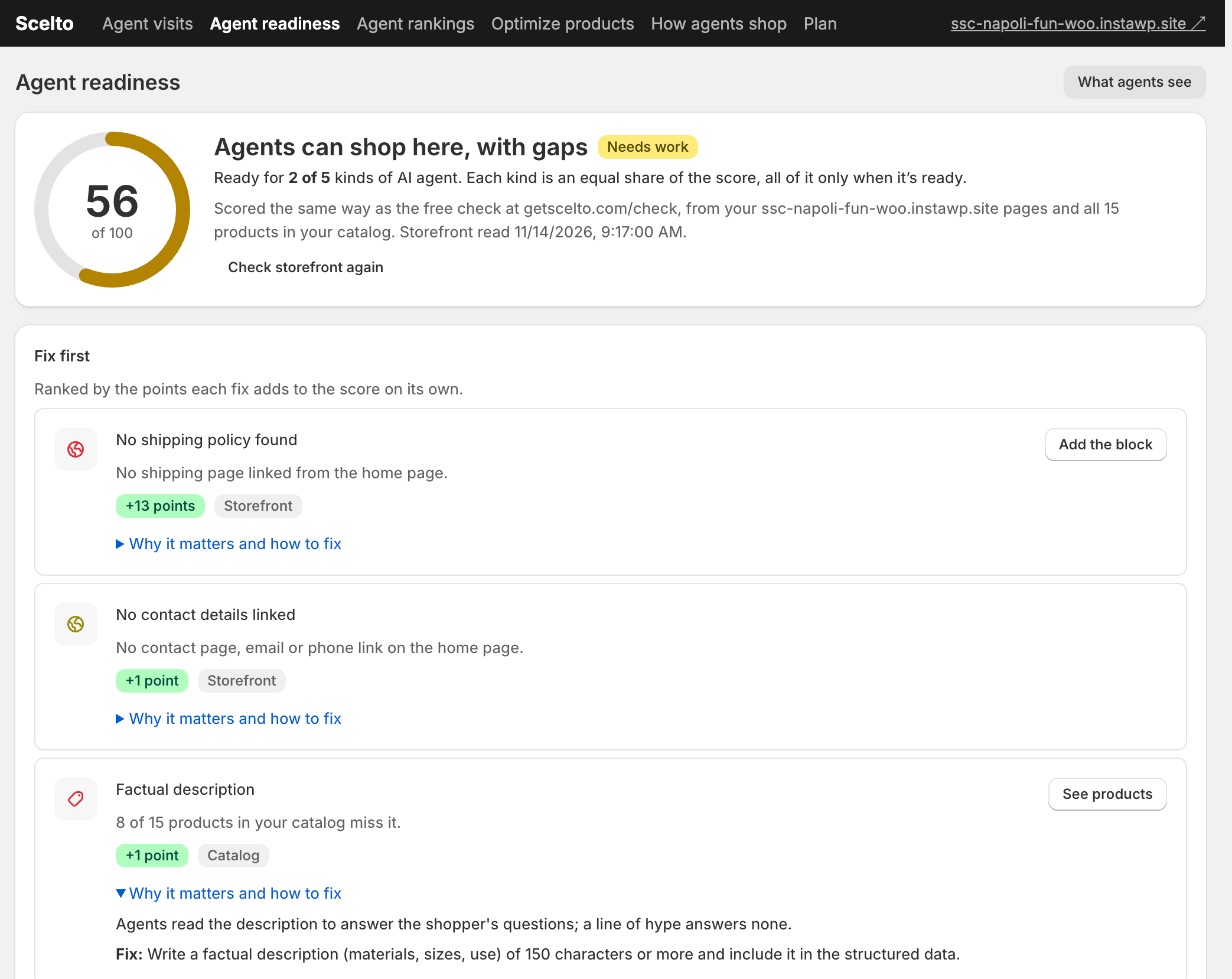
The free Scelto plugin for WooCommerce adds a readiness score inside WordPress that
says what's missing, where, how many points it's worth and how to fix it. It also serves an agent view of your store on
your own domain at /scelto/view, offers an optional Stock, shipping and returns block for product pages, and
shows detected agent visits: agents that name themselves, and visits with automation signals. It doesn't see every agent,
since many read pages without running scripts. It never changes prices, stock or offers.
Questions
Why can't ChatGPT or other assistants see my WooCommerce store?
Usually one of five things: the store is still in Coming soon mode, "Discourage search engines" is ticked, a security plugin or CDN blocks or challenges them, the price is drawn by JavaScript, or the product schema is missing or duplicated. Each takes a few minutes to check.
Does WooCommerce add product schema by default?
Yes. WooCommerce core adds Product structured data (JSON-LD) to product pages. SEO plugins can add a second Product block; keep one.
Do AI agents run JavaScript on my store?
Many don't. Make sure the product's name, price and availability are in the HTML your server sends.
Do I need GTINs?
They help assistants match your product with the same product at other sellers. Fill in WooCommerce's GTIN, UPC, EAN or ISBN field, or give brand and manufacturer part number (MPN) when a product has no barcode.
Can AI assistants buy from my WooCommerce store?
On WooCommerce's protocol page (checked 17 November 2026), agents that pay with Link can check out on stores that take cards, while UCP and ACP are "coming soon". With Scelto's AI agents setting, a shopper's agent can propose an order the shopper approves; the shopper then pays on your checkout.
What is poppy.json?
The Personal Agent Protocol (Poppy) file at /.well-known/poppy.json. It tells shoppers' agents, such as Meta's Muse, where your store's own agent is. It's optional.
Will this change what human shoppers see?
It shouldn't. Agents and people should get the same prices, stock and policies. Scelto's product-page block is plain text everyone sees, and it's off until you turn it on.
Is Scelto's WooCommerce plugin free?
Yes, with no time limit. Pro is $29 a month after a 14-day free trial.
See where your WooCommerce store stands
Download the free Scelto plugin: about five minutes in your WordPress admin. Not ready to install? Run the free agent check on your store's public pages. On Shopify instead? See the Shopify checklist.
Facts checked on 17 November 2026.
See how AI agents read your store
The free agent check works on any store platform and needs no sign-up.
Check your store