Wix AI Agent Readiness Checklist (2026): What AI Shopping Assistants Read on Wix Stores, and What to Fix
Guide8 min readFacts checked on the date above
Wix,agent-ready.
The checklist
Disclosure: Scelto makes a free Wix app, mentioned at the end. Every check below works without it.
Short answer: Wix does more for AI agents out of the box than most platforms. It renders product pages on the server, adds Product structured data, lets agents in through its default robots.txt and, on most stores with their own domain, publishes a file that points shoppers' agents to its built-in site tools. What Wix can't do for you is the product data itself: in the stores we checked, its structured data had no brand or barcode, and template stores often still carry placeholder shipping and return policies. That's where most Wix stores lose agents.
This checklist takes about ten minutes with a browser. The facts about Wix's output come from five live Wix Stores product pages and a scan of 11 Wix stores, checked on 18 November 2026.
The checklist at a glance
| Check | How to check | Where to fix |
|---|---|---|
| Site is published and indexable | Open the store in a private window | Publish in the Editor; SEO settings in the dashboard |
| Own domain | Look at the address | A premium plan with a connected domain |
| robots.txt lets agents in | Open yourstore.com/robots.txt | SEO settings (robots.txt editor) |
| Agent file published | Open yourstore.com/.well-known/poppy.json | Wix generates it; nothing to edit |
| Brand stated | Read the product page | Product name, description or an info section |
| Barcode or SKU | Open a product in the dashboard | Each product's and option's SKU; barcode in the text |
| Factual description with specs | Read it as a stranger | Product description, info sections |
| Image alt text | Product › images | Each product image |
| Accurate stock | Compare a few products with reality | Product › Inventory |
| Real shipping and returns terms | Read your policies | Store policies and product info sections |
1. Access: can agents reach the store?
Short answer: on Wix this is usually fine. Check that the site is published, indexable and on its own domain, and that you haven't added rules that turn agents away.
- The site is published. Changes in the Editor aren't live until you publish. Check the store in a private window, since you see drafts while you're signed in.
- Search engines are allowed to index it. Wix's SEO settings have a switch that tells search engines not to index the site. Many AI agents respect it too, so keep indexing on for a live store.
- robots.txt lets search and shopping agents in. Wix's default file allows every agent (only a few SEO crawlers are slowed down or blocked). If you edited it, check you haven't blocked the assistants you want; our robots.txt guide lists which agents search and which only train models.
- Your own domain. A free site lives at
username.wixsite.com/site-name. Agents can read its pages, but anything that agents look for at the domain root, like the agent file in section 5, belongs to Wix, not you.
curl -sI -A "OAI-SearchBot/1.0" https://yourstore.com/product-page/your-product | head -1
curl -s https://yourstore.com/robots.txt | head -5
You want 200 on the first line, and no Disallow: / for the agents you care about.
2. Pages: what agents get without scripts
Short answer: Wix sends the product's name, price and stock in the HTML, so agents that don't run scripts still see them. Product pages are heavy, though (about 0.8 to 1 MB of HTML on the stores we checked), so keep the key facts in the product's own fields, near the top, rather than in page decorations.
- Facts in fields, not in images. A size chart or a price in an image is invisible to most agents. Put sizes, materials and dimensions in text.
- Key facts near the top. Browser agents read a few screens. Price, options and stock should come before long galleries, reviews and pop-ups.
- Option names say what they are. "Size: M" and "Color: Navy" help an agent pick the right option; "Option 1" doesn't.
- No instructions aimed at AI. Give agents the same facts as people. Agents treat hidden instructions as an attack and may warn the shopper.
3. Product data: what Wix's schema leaves out
Short answer: Wix's Product structured data covers the name, description, images, price, currency and availability. In the five stores we checked, it had no brand and no barcode, and the SKU only when the product had one. So the brand, identifiers and specs have to be readable in the product's text.
- Brand. Shoppers ask for brands by name, and none of the Wix product pages we checked stated one in their structured data. Say the brand in the product name or the first line of the description.
- SKU, barcode or model number. Agents match the same product across sellers by identifier, not title. Fill in the SKU on every product and option, and add the barcode (GTIN, UPC, EAN) or the manufacturer's model number in the description or an info section when the product has one.
- A factual description with specs. Many agents read only the title and description. Put size, material, weight, capacity and compatibility in a short list. Wix's product info sections (such as "Product info") are a good place for "Name: value" facts.
- Image alt text. Describe what's in each photo: the product, its color and its use. Agents and screen readers both rely on it.
- Options with their own price and stock. Wix's structured data showed one offer per product page. When options differ in price or stock, state it in the option names or the description so an agent doesn't quote the wrong one.
4. Trust: shipping, returns and stock
Short answer: agents compare sellers on the delivered total, delivery time and return terms, and they read your policies word for word. Wix templates come with sample policy text; if you never replaced it, agents quote the sample.
- Replace template policies. When we asked Meta's Muse about a Wix template store, it flagged the shipping and refund policies as placeholder text. Write your real terms: the return window in days, who pays return shipping, items that can't be returned, and delivery times and costs by region.
- Link policies from product pages, not only the footer. A product info section with your shipping and returns summary puts the terms where agents look.
- Stock that's true right now. Keep inventory tracked in Wix Stores, or synced from your inventory system, so agents don't recommend what you can't ship.
- A way to reach you. Business details (name, email, phone, address) in your Wix business info and on a contact page.
5. Wix and shoppers' agents: what's already live
Short answer: on most Wix stores with their own domain, Wix publishes /.well-known/poppy.json
(Personal Agent Protocol 1.0, with a 0.4 fallback) pointing to its built-in site tools at /_api/mcp.
Shoppers' agents can use those tools to search the site and browse products. You don't need to do anything, and apps
can't add their own agent to the file.
| What | Status on 18 November 2026 | Notes |
|---|---|---|
| poppy.json on stores with their own domain | 9 of 11 Wix stores we checked | Generated by Wix; two returned a Wix 404 |
| poppy.json on free wixsite.com sites | None | The site sits under Wix's domain |
| Wix site tools (MCP) | Live with the file | Anonymous, general-purpose: site search, business details, Wix APIs |
| Agent entries added by apps | Not possible | Headless Wix sites publish their own file |
What we saw agents do: on a Wix store with the file, Muse used Wix's tools and got the right answer, but took about eight minutes and asked the shopper for permission about eight times. Dot by OpenAI read the same store's pages and answered in about a minute. On a free wixsite.com store, Muse found no file and browsed page by page. Either way, the agent ends up with your product data, which is why sections 3 and 4 matter most. Our Poppy guide has the full runs.
How to run this check on your store
The manual route is the checks above: a private window, the two curl commands, and a read of one product page and your policies as a stranger. For a quicker read, the free agent check reads your public pages the way agents do, on any platform, with no sign-up.
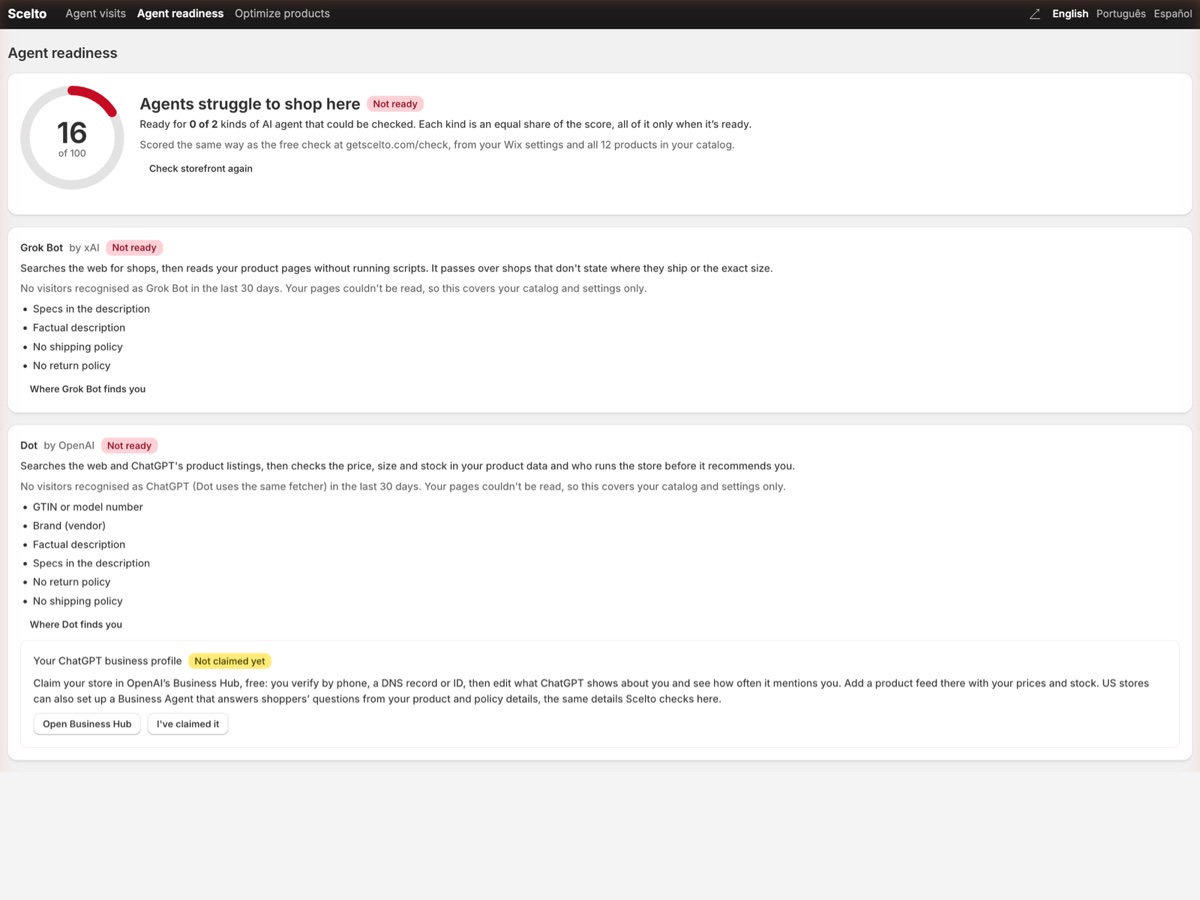
The free Scelto app for Wix does this across your whole catalog inside your Wix dashboard: a readiness score for each kind of AI agent, fixes ranked by impact with the products they affect, one-click alt text and spec lists that you preview and can undo, and the orders AI assistants sent you. It never changes prices, stock, titles or your own copy. It's free on the Wix App Market.
Questions
Can ChatGPT and other assistants read my Wix store?
Usually, yes. Wix renders product pages on the server, so the name, price and stock are in the HTML agents fetch, and Wix's default robots.txt lets agents in. What they find depends on your product data: brand, identifiers, a factual description, and real shipping and returns terms.
Does Wix add product schema by default?
Yes. On the five Wix Stores product pages we checked (18 November 2026), Wix added Product structured data with name, description, images and one offer (price, currency, availability), plus the SKU when the product had one. None included a brand or a barcode (GTIN).
What is poppy.json, and does my Wix store have one?
It's the file for the Personal Agent Protocol (Poppy), which tells shoppers' agents, such as Meta's Muse, how to talk to a business. Wix publishes one automatically on most stores with their own domain: 9 of the 11 Wix stores we checked had it, pointing to Wix's built-in site tools. Sites on a free wixsite.com address don't have one.
Can a Wix app add its own agent to my poppy.json?
Not today. Wix generates the file, and apps can't add entries to it. Stores on headless Wix, with their own frontend, publish their own file and can list any agent.
Do I need a custom domain?
For agents that use poppy.json, yes in practice: free wixsite.com sites live under Wix's own domain, so there's no agent file for your store. Agents can still read your pages there.
Will this change what human shoppers see?
Only for the better: every fix here is something shoppers read too, like a clear description, a real return policy and correct stock. Agents and people should get the same facts.
Is Scelto for Wix free?
Yes. Scelto is a free app on the Wix App Market, with no charges anywhere in it.
See where your Wix store stands
Run the free agent check on your store's public pages, or add Scelto to your Wix site, free. On another platform? See the WooCommerce checklist or the Shopify checklist.
Facts checked on 18 November 2026.
See how AI agents read your store
The free agent check works on any store platform and needs no sign-up.
Check your store